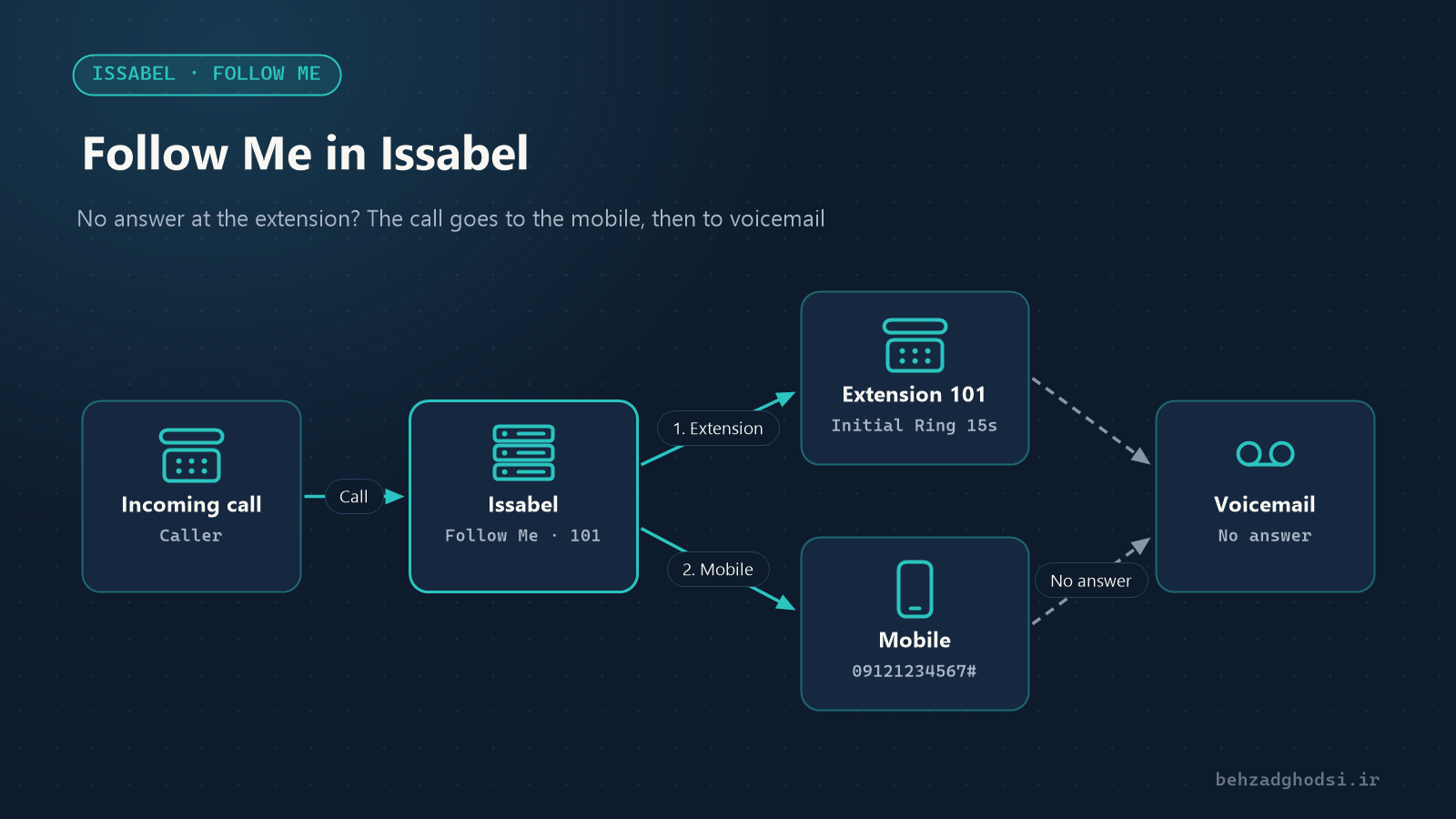
Imagine the sales manager is out visiting a project site and an important customer calls their extension. The desk phone rings, nobody answers and the call ends up in voicemail. Follow Me in Issabel is built for exactly this: if the extension does not answer, the call is passed on to other numbers you choose, including a mobile.
What is Follow Me, and how is it different from Call Forward?
Call Forward sends a call to another number unconditionally, or when the line is busy or unanswered. Follow Me is more flexible:
- You can define several destinations, for example first the extension, then the mobile, then the receptionist.
- You can choose whether the destinations ring at the same time or one after another.
- You can ask the person answering on the mobile to confirm before the call is connected, so it does not end up in the mobile operator’s voicemail.
- If nobody answers, the call goes to a defined destination such as the extension’s voicemail or an IVR.
Prerequisites
- The extension exists under Extensions.
- If calls should reach a mobile, you need at least one working outbound Trunk and an Outbound Route that can dial mobile numbers.
- You are logged in to the Issabel web panel as an administrator.
Menu names may differ slightly between Issabel versions, but the settings are structured the same way.
Creating Follow Me step by step
From the PBX menu open PBX Configuration and choose Follow Me in the side list. The list of extensions appears; pick the one you want, for example 101.
Main settings
- Disable: when ticked, Follow Me stays defined but does nothing. Untick it to enable it.
- Initial Ring Time: how many seconds only the extension itself rings before the other destinations join in. 15 seconds suits most offices.
- Ring Strategy: how the destinations ring.
ringallv2rings all of them at once and is usually the best choice.hunttries them one by one, in order. - Ring Time: how long the Follow Me destinations ring. More than 25 to 30 seconds usually makes the caller hang up.
- Follow-Me List: the destinations, one per line.
In the Follow-Me List, write extensions as they are. Write external numbers with a # at the end so Issabel dials them through an Outbound Route:
101
07700900123#
Important additional settings
- Announcement: a message played to the caller before the transfer, for example “Please hold, we are connecting you to an expert.”
- Play Music On Hold: play hold music instead of a ringing tone.
- CID Name Prefix: a prefix added to the caller’s name, such as
FM:, so you know the call came through Follow Me. - Confirm Calls: when you answer on the mobile, the system asks you to press 1 to accept the call. This matters a lot for external numbers: if the mobile is switched off, the operator’s voicemail answers, and without this option the call is connected to it.
- Change External CID Configuration: decides which number is shown on your phone when the call goes to the mobile.
- Destination if no answer: where the call goes if no destination answers. The usual choice is the extension’s own voicemail.
Finally click Submit and then the red Apply Config button to apply the settings.
Switching it on and off from the phone
You do not have to log in to the panel every time. Issabel has a feature code that turns Follow Me on or off from the phone itself; the default is usually *21. Check the exact code under PBX Configuration in Feature Codes.
An example
Say that at a distribution company the sales manager is on extension 105. A good set-up would be:
- Initial Ring Time: 12 seconds of only their own extension ringing.
- Ring Strategy:
ringallv2 - Follow-Me List: the sales manager’s mobile and their deputy’s extension (
106) - Confirm Calls: on
- Destination if no answer: voicemail of extension
105
With this, a customer’s call is answered either by the manager on their mobile or by the deputy, and at worst a message is left in voicemail.
Problems you will run into
- The call does not reach the mobile: check the Outbound Route. Its dial pattern must match the mobile number and the trunk must have a free channel.
- The call is connected to the mobile operator’s voicemail: turn on Confirm Calls.
- The carrier rejects the call: some providers do not allow another number to be shown as Caller ID. In Change External CID Configuration or the trunk settings, set your own landline number as the outbound Caller ID.
- External lines fill up quickly: every call passed to a mobile uses one inbound and one outbound channel. Keep the number of trunk channels in mind.
- The settings do not work: do not forget to click Apply Config after Submit.
Follow Me is one of the simplest and most useful features of Issabel. With a few minutes of set-up, important calls are answered even when you are not at your desk. Start by enabling it for a few key extensions, such as managers and sales, and do not forget Confirm Calls for external numbers.