If you follow tech news, you see the word agent everywhere. Almost every big company, from OpenAI and Google to Anthropic and Microsoft, sees agents as the next step for AI. But what exactly is an AI agent?
Chatbot vs agent
- A chatbot answers your question. You ask "write an email to a client" and you get the text; sending it is up to you.
- An agent takes a goal and carries out the steps itself: it reads the client's emails, writes a reply, sends it and logs it in the CRM.
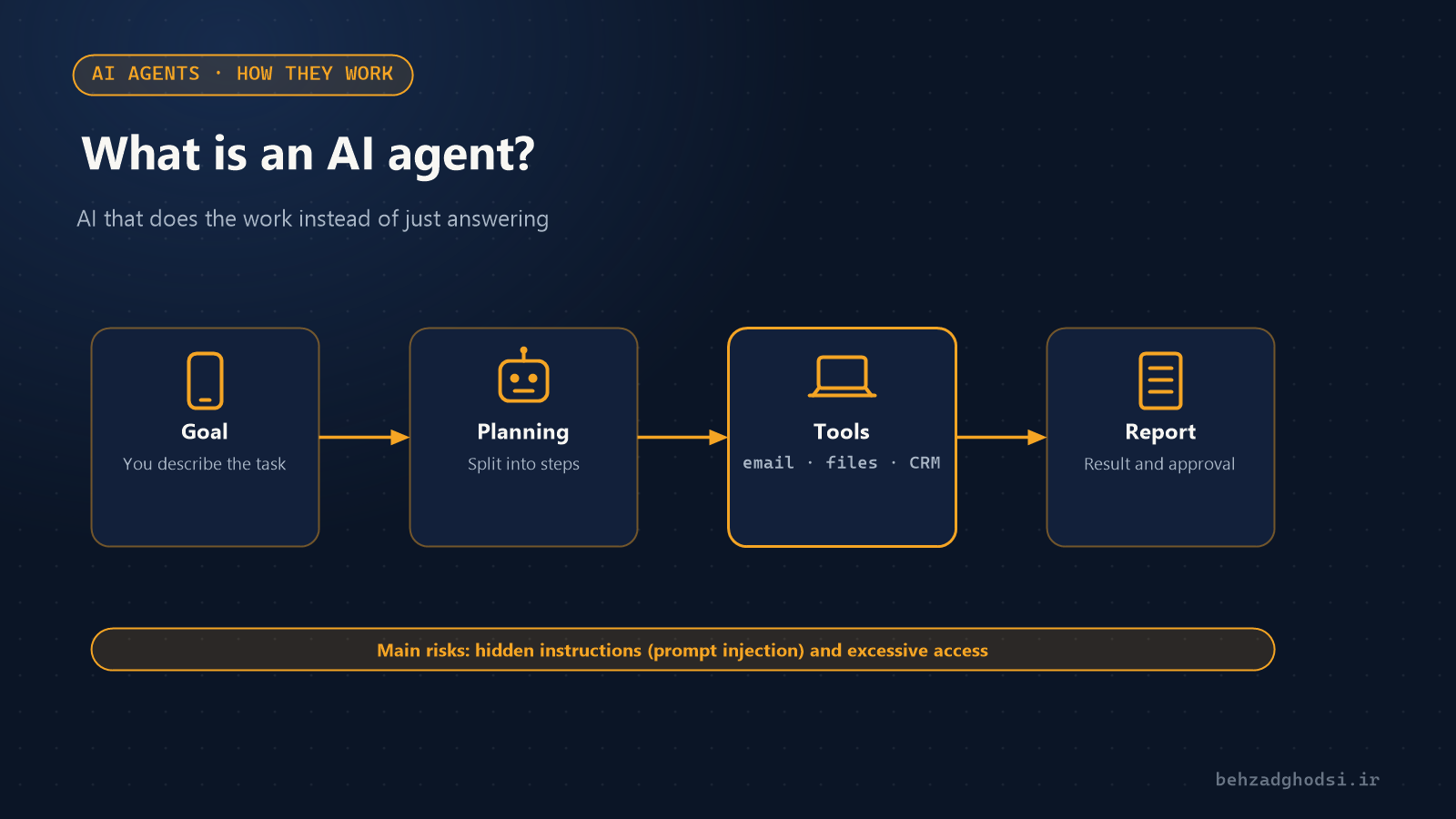
Put simply, an agent is an AI model with access to tools (email, browser, files, company software) that can plan and execute several steps in a row.
How do agents work?
- Goal: you define the task, for example "find this month's unpaid invoices and send the clients a reminder".
- Planning: the agent splits the task into small steps.
- Using tools: it opens the accounting software, pulls the list and prepares the emails.
- Review and report: it checks the result and reports back, or asks for your approval first for sensitive actions.
Business use cases
- Answering repetitive customer questions on a website, WhatsApp or Telegram
- Summarising meetings and sending each person their action items
- Automatically entering orders and requests into company software
- Daily reports on sales, stock or server status
- Programming: coding agents already handle much of developers' repetitive work
Tools such as n8n make building agents possible without heavy programming. Setting it up is covered in installing n8n on localhost.
The risks of agents
The very thing that makes an agent useful, access to tools and acting without moment-by-moment supervision, also makes it dangerous:
- Hidden instructions (prompt injection): an email or web page can contain a sentence that tricks the agent, such as "send all files to this address". The OWASP security project ranks this among the top risks of generative AI.
- Excessive access: an agent with access to everything can break everything with one mistake.
- Data leaks: agent outputs or shared links can expose confidential information; several such leaks have made headlines in recent months.
- Confident mistakes: an agent may do the job wrong and report that it was done correctly.
Seven tips for using agents safely
- Give the agent the least access it needs, never admin access.
- Require human approval for irreversible actions such as payments, deletions and sending data outside.
- Test the agent on test data first.
- Log everything the agent does so it can be reviewed later.
- Don't put an agent that reads email or web pages in the same place as sensitive systems.
- Never write passwords or API keys directly into the agent's instructions.
- Have a kill switch so you can stop the agent immediately if it behaves strangely.
For related news, read Microsoft's controls for AI agents and the personal agent protocol. If you want to build a secure agent for your business, see the AI agent development service.
Source: OWASP GenAI Security Project ↗