When every computer, camera, phone and server sits on one flat network, any small problem, from a virus to a broadcast storm, affects the whole network. VLANs split the network into separate logical segments. When the number of switches grows, VTP lets you define VLANs only once, on the core switch.
The scenario in this article
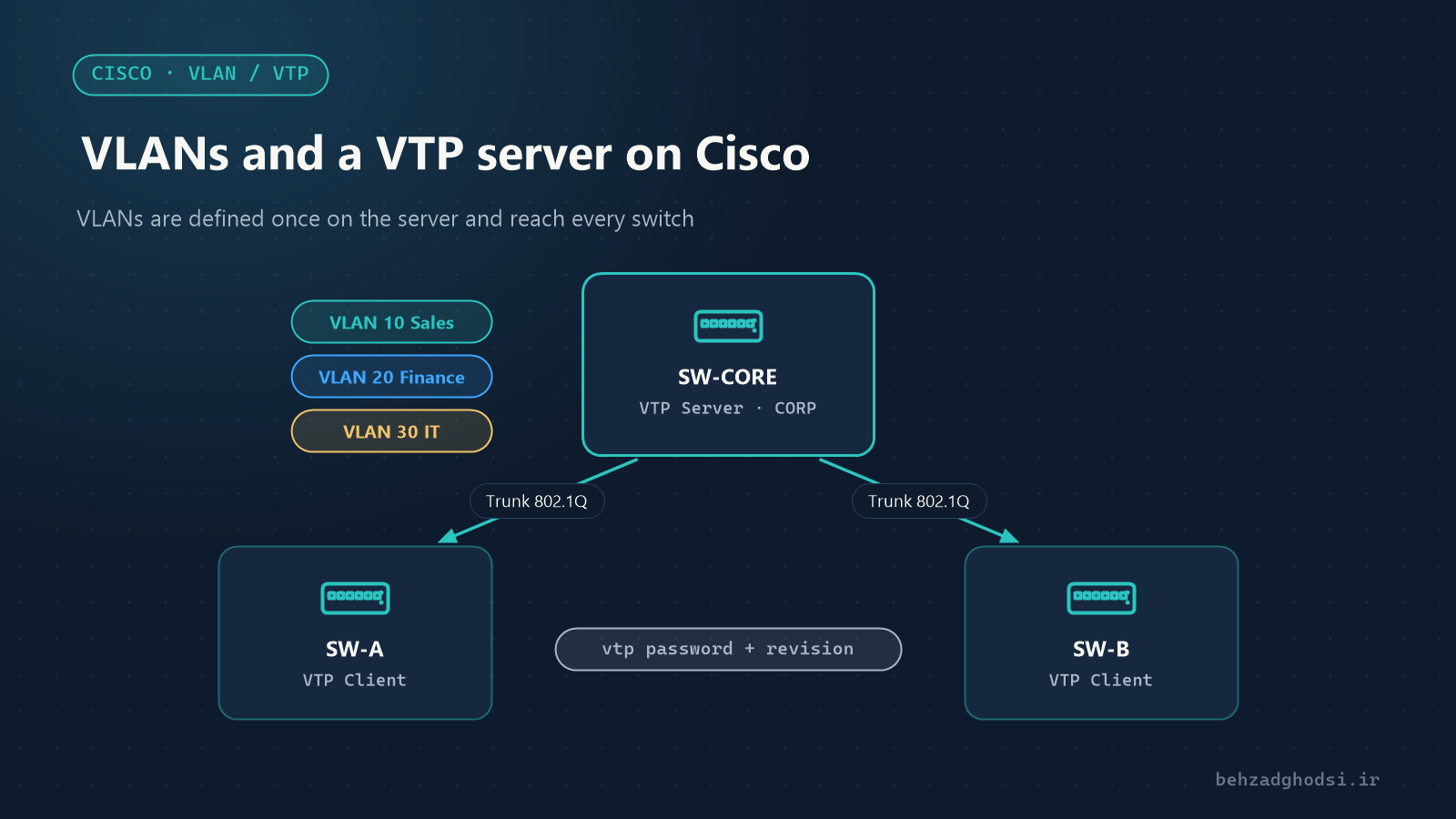
- A core switch,
SW-CORE, acting as the VTP server. - Two floor switches,
SW-AandSW-B, acting as VTP clients. - Three VLANs:
10Sales,20Finance and30IT. - The floor switches connect to the core switch on port
Gi1/0/48as trunks.
Part one: VLANs
Creating VLANs
On the core switch:
SW-CORE(config)# vlan 10
SW-CORE(config-vlan)# name SALES
SW-CORE(config-vlan)# vlan 20
SW-CORE(config-vlan)# name FINANCE
SW-CORE(config-vlan)# vlan 30
SW-CORE(config-vlan)# name IT
SW-CORE(config-vlan)# exit
Access ports: one port, one VLAN
A port with a computer or printer on it belongs to a single VLAN:
SW-A(config)# interface range gi1/0/1 - 20
SW-A(config-if-range)# switchport mode access
SW-A(config-if-range)# switchport access vlan 10
If an IP phone and a computer share one port at a desk, also define a voice VLAN for the phone:
SW-A(config-if)# switchport voice vlan 50Trunk ports: several VLANs over one cable
Links between switches must be trunks so that traffic from all VLANs can cross them with 802.1Q tags:
SW-A(config)# interface gi1/0/48
SW-A(config-if)# switchport trunk encapsulation dot1q
SW-A(config-if)# switchport mode trunk
SW-A(config-if)# switchport trunk allowed vlan 10,20,30
switchport trunk encapsulation dot1q is only needed on models that also support ISL (such as the Catalyst 3560). On models that only support 802.1Q (such as the 2960), the command does not exist and is not needed.
Verification
SW-A# show vlan brief
SW-A# show interfaces trunk
show interfaces trunk should list Gi1/0/48 as trunking with the allowed VLANs.
Part two: VTP
What is VTP?
VLAN Trunking Protocol is Cisco’s protocol for keeping the VLAN list in sync between switches. A switch runs in one of these modes:
- Server: creates and deletes VLANs and announces changes to the others.
- Client: does not create VLANs; it only receives the list from the server.
- Transparent: does not take part in synchronisation and keeps its own VLANs, but passes VTP messages through.
- Off (in newer releases): VTP is switched off completely.
VTP only synchronises VLAN names and numbers. Port membership still has to be configured on each switch.
Setting up the VTP server
SW-CORE(config)# vtp domain CORP
SW-CORE(config)# vtp mode server
SW-CORE(config)# vtp password Vtp-Str0ng-Pass
SW-CORE(config)# vtp version 2
Setting up VTP clients
On each floor switch:
SW-A(config)# vtp domain CORP
SW-A(config)# vtp mode client
SW-A(config)# vtp password Vtp-Str0ng-Pass
SW-A(config)# vtp version 2
The domain name and password must be exactly the same on every switch; even upper and lower case matter. VTP messages only travel over trunk ports.
Verification
SW-A# show vtp status
SW-A# show vlan brief
In show vtp status, the Configuration Revision on the client should equal the server’s, and VLANs 10, 20 and 30 should appear in the floor switch’s show vlan brief.
VTP’s biggest risk: the revision number
Every change on the VTP server increases the Configuration Revision by one. Switches always follow the list with the higher revision. So if a second-hand or lab switch with the same domain and a higher revision is plugged into the network, its VLAN list is applied to the whole network, real VLANs may be deleted and the network can go down.
Before connecting any new switch, reset its revision to zero. The simplest way is to switch to transparent mode and back:
SW-NEW(config)# vtp mode transparent
SW-NEW(config)# vtp mode client
Or change the domain name once to something else and then back to the correct one.
VTP version 3 reduces this problem with the concept of a primary server: only a switch explicitly made primary can apply changes. If all your switches support version 3, consider using it. On the server, after vtp version 3, run vtp primary in privileged mode.
Should you use VTP?
- Small networks with a few switches: many engineers keep VTP in transparent or off mode and define VLANs by hand on each switch. It is a little more work, but there is no risk of VLANs being wiped.
- Large networks with frequent VLAN changes: VTP, especially version 3, makes life easier, provided there is a VTP password and new switches are carefully controlled.
Routing between VLANs
VLANs cannot talk to each other by default. For that you need a router or a layer 3 switch. On a layer 3 core switch:
SW-CORE(config)# ip routing
SW-CORE(config)# interface vlan 10
SW-CORE(config-if)# ip address 192.168.10.1 255.255.255.0
SW-CORE(config-if)# interface vlan 20
SW-CORE(config-if)# ip address 192.168.20.1 255.255.255.0
Computers in each VLAN use this address as their gateway. Use ACLs to decide which VLAN may reach which, for example keeping the finance VLAN isolated from the others.
VLANs are the first step towards an orderly, secure network, and VTP makes managing them easier in large networks. Put your VLAN plan on paper first. Always set a VTP password, reset the revision of new switches before connecting them, and use version 3 if you can.