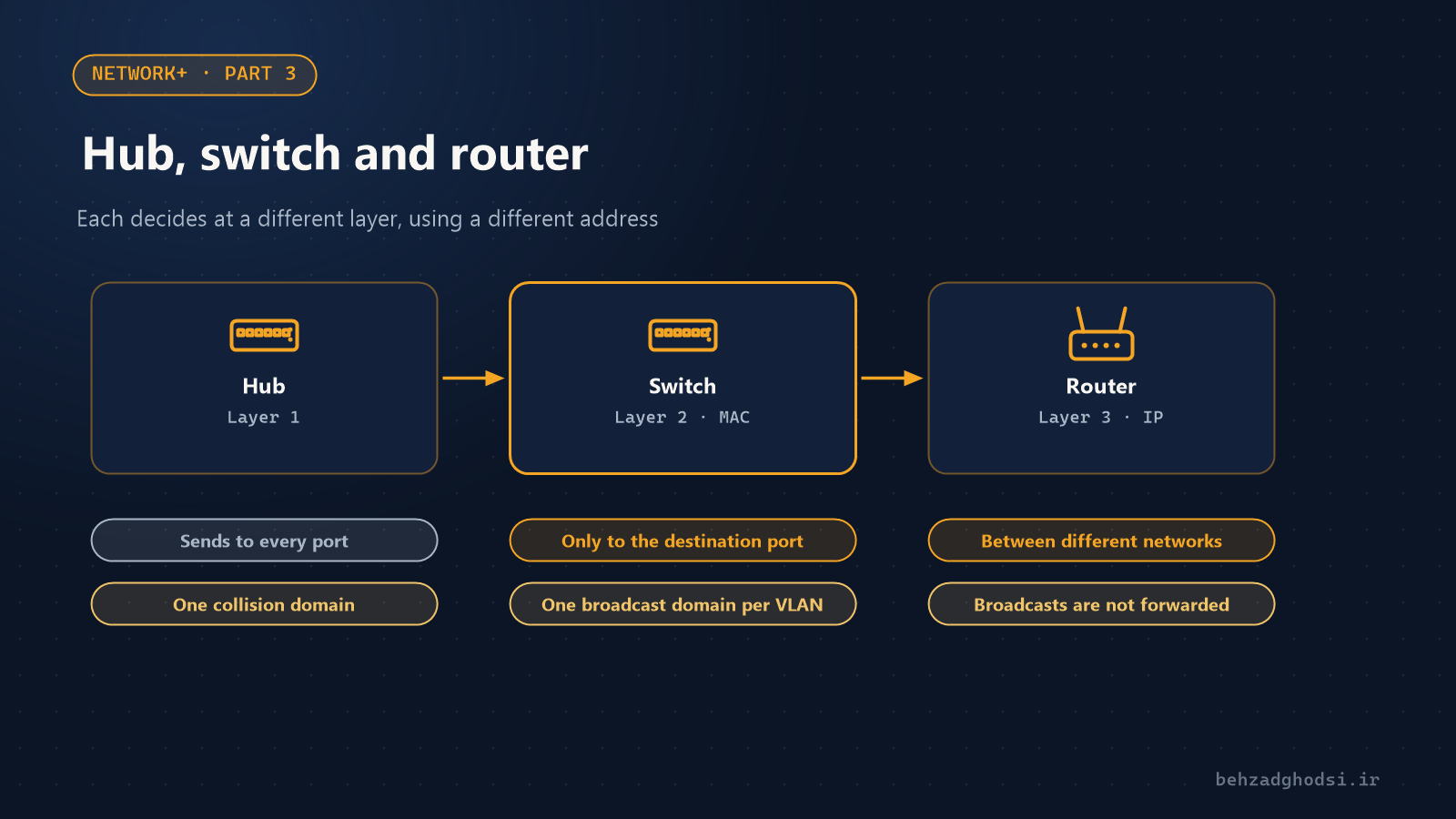
From the outside, hubs, switches and routers look alike: a box with some ports. The difference is what they do with a packet when it arrives. Once you know that, network design and troubleshooting get much easier.
Hub: layer 1, everything to everyone
A hub understands no addresses. Any signal arriving on one port is sent out of every other port. The result:
- Everyone is in one collision domain, so only one device can talk at a time.
- It works half-duplex, and the network slows down as more devices are added.
- Anyone can see everyone else's traffic.
Hubs have all but disappeared from the market, but the exam still asks about them.
Switch: layer 2, based on MAC addresses
Every network card has a six-byte MAC address, such as 00:1A:2B:3C:4D:5E. A switch learns which MAC is behind which port and sends each frame only to that port:
- A frame arrives on port 3; the switch records the source MAC against port 3 in its MAC table.
- If it knows the destination MAC, it sends the frame only to that port.
- If it doesn't, it sends this one frame to everyone (flooding) and learns from the reply.
Each switch port is its own collision domain and runs full-duplex. But all ports are still in one broadcast domain, so a broadcast reaches everyone.
On a Cisco switch you view the MAC table like this:
show mac address-table
show mac address-table interface GigabitEthernet1/0/5
ARP: the bridge between IP and MAC
To send a packet on the local network, a computer needs the destination MAC. The ARP protocol asks with a broadcast, "who has this IP?", and the owner replies with its MAC. View the Windows ARP table with arp -a.
VLANs: several networks on one switch
With VLANs you split one physical switch into several separate logical networks; for example, cameras, phones and users each get their own VLAN. Each VLAN is a separate broadcast domain, so camera broadcasts don't reach computers, and security improves too.
- An access port belongs to one VLAN and connects to a computer or camera.
- A trunk port carries several VLANs, tagged with 802.1Q, between switches or up to a router.
Router: layer 3, based on IP addresses
A router connects different networks: the internal network to the internet, or the finance VLAN to the server VLAN. It decides where to send each packet based on the destination IP and its routing table. A router doesn't forward broadcasts, so each of its ports is a separate broadcast domain.
Most routers do other jobs too: NAT for sharing an internet connection, firewalling, DHCP and VPN. MikroTik is a familiar example.
What is a layer 3 switch?
A layer 3 switch is a switch that also routes between VLANs, in hardware and much faster than a router. In enterprise networks, internal routing between VLANs is usually done by the core switch, and the router or firewall is left only for the internet connection.
Summary in one table
| Device | Layer | Forwards by | Collision domain | Broadcast domain |
|---|---|---|---|---|
| Hub | 1 | Nothing; sends to all | One for all | One |
| Switch | 2 | MAC address | One per port | One (or one per VLAN) |
| Router | 3 | IP address | One per port | One per port |