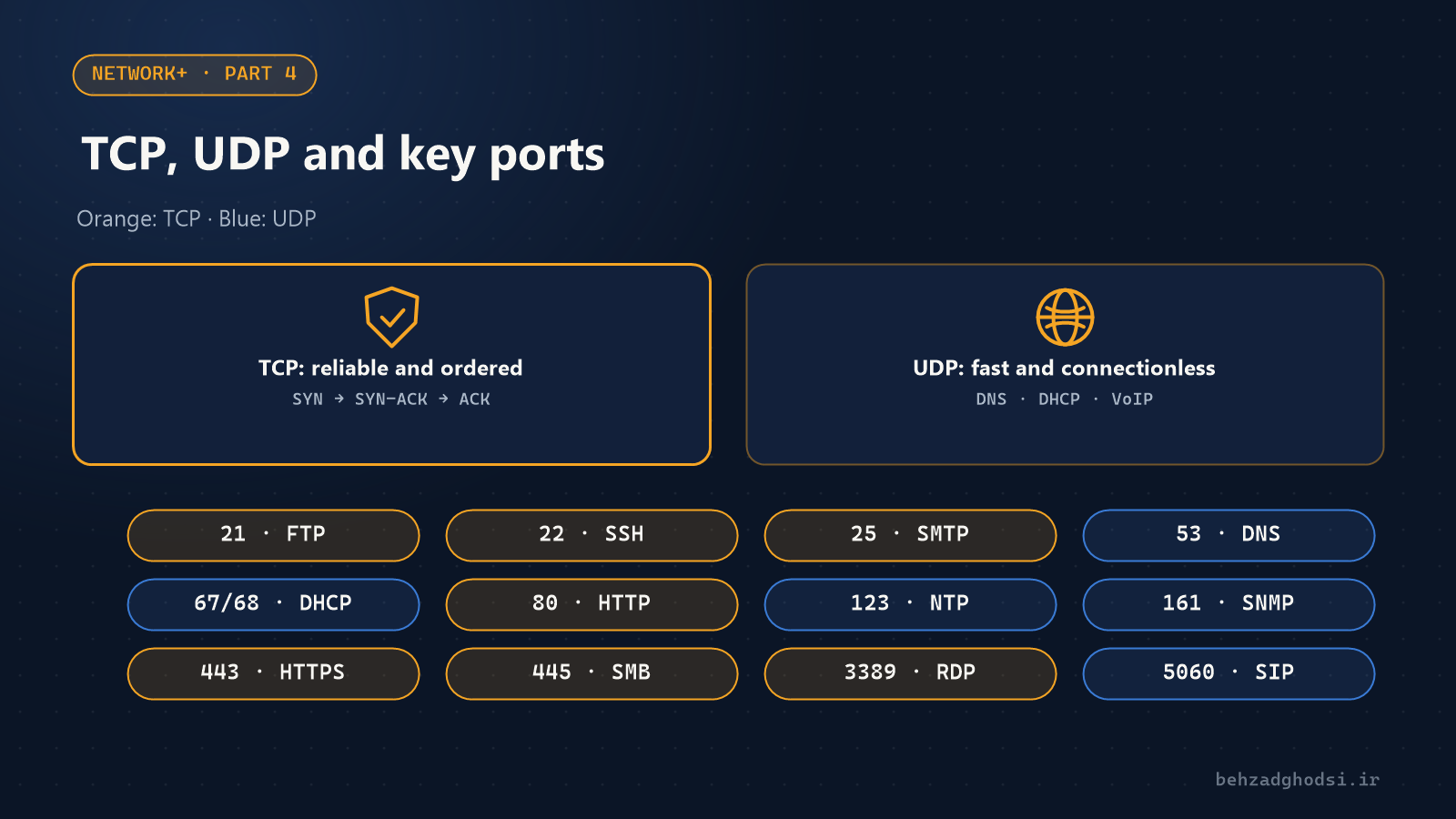
An IP address gets a packet to the right device, but every server runs dozens of services. Whether the packet reaches the web server or the email service is layer 4's job: the TCP and UDP protocols and port numbers.
What is a port?
A port is a number from 0 to 65535 that identifies a service on a device. If the IP is the building's address, the port is the flat number. The combination of IP and port, such as 192.168.1.10:443, is called a socket.
- 0 to 1023: well-known ports, such as 80 and 443.
- 1024 to 49151: registered ports for software, such as 3389.
- 49152 and up: ephemeral ports the client picks for each connection.
TCP: reliable and ordered
TCP sets up a connection before sending, using the three-way handshake:
- The client sends SYN: "I want to connect."
- The server replies SYN-ACK: "Agreed, are you ready too?"
- The client sends ACK, and the connection is established.
After that, TCP numbers the data, gets an acknowledgement for each part and resends anything lost. That is why the web, email, file transfer and SSH run over TCP, where not a single byte can go missing.
UDP: fast and no-frills
UDP doesn't set up a connection or wait for acknowledgements; it just sends. It has less overhead and is faster. It suits work where delay is worse than losing a few packets:
- Voice and video calls (VoIP audio with RTP)
- DNS, which is one short question and one short answer
- DHCP, live streaming and online games
In a VoIP call, resending a lost packet is pointless; that moment of audio has already passed.
| Feature | TCP | UDP |
|---|---|---|
| Connection | Connection-oriented (handshake) | Connectionless |
| Reliability | Acknowledgements and retransmission | None |
| Order | Packets arrive in order | Not guaranteed |
| Speed and overhead | Slower, more overhead | Faster, low overhead |
| Examples | HTTP, SSH, SMTP | DNS, DHCP, VoIP |
Important ports to memorise
| Port | Protocol | Use |
|---|---|---|
| 20 and 21 | TCP | FTP, file transfer |
| 22 | TCP | SSH and SFTP, secure management |
| 23 | TCP | Telnet, insecure management; don't use it |
| 25 | TCP | SMTP, sending email |
| 53 | UDP and TCP | DNS |
| 67 and 68 | UDP | DHCP |
| 69 | UDP | TFTP, e.g. for VoIP phone configuration files |
| 80 | TCP | HTTP |
| 110 and 143 | TCP | POP3 and IMAP, receiving email |
| 123 | UDP | NTP, time synchronisation |
| 161 and 162 | UDP | SNMP, monitoring |
| 389 and 636 | TCP | LDAP and LDAPS, Active Directory |
| 443 | TCP | HTTPS |
| 445 | TCP | SMB, Windows file sharing |
| 3389 | TCP | RDP, Remote Desktop |
| 5060 and 5061 | UDP and TCP | SIP, VoIP |
How to check whether a port is open
In Windows PowerShell:
Test-NetConnection 192.168.1.10 -Port 3389
netstat -ano | findstr LISTENING
The first command tells you whether port 3389 on the server is reachable from this computer. The second shows which ports are listening for connections on this computer.
A security note: never open ports such as 3389 (RDP) and 23 (Telnet) directly to the internet. Use a VPN for remote access.