There are two services users never hear about until they break: DNS and DHCP. If DHCP fails, nobody gets an address; if DNS fails, "the internet is down" even though the internet is working.
DNS: the internet's phone book
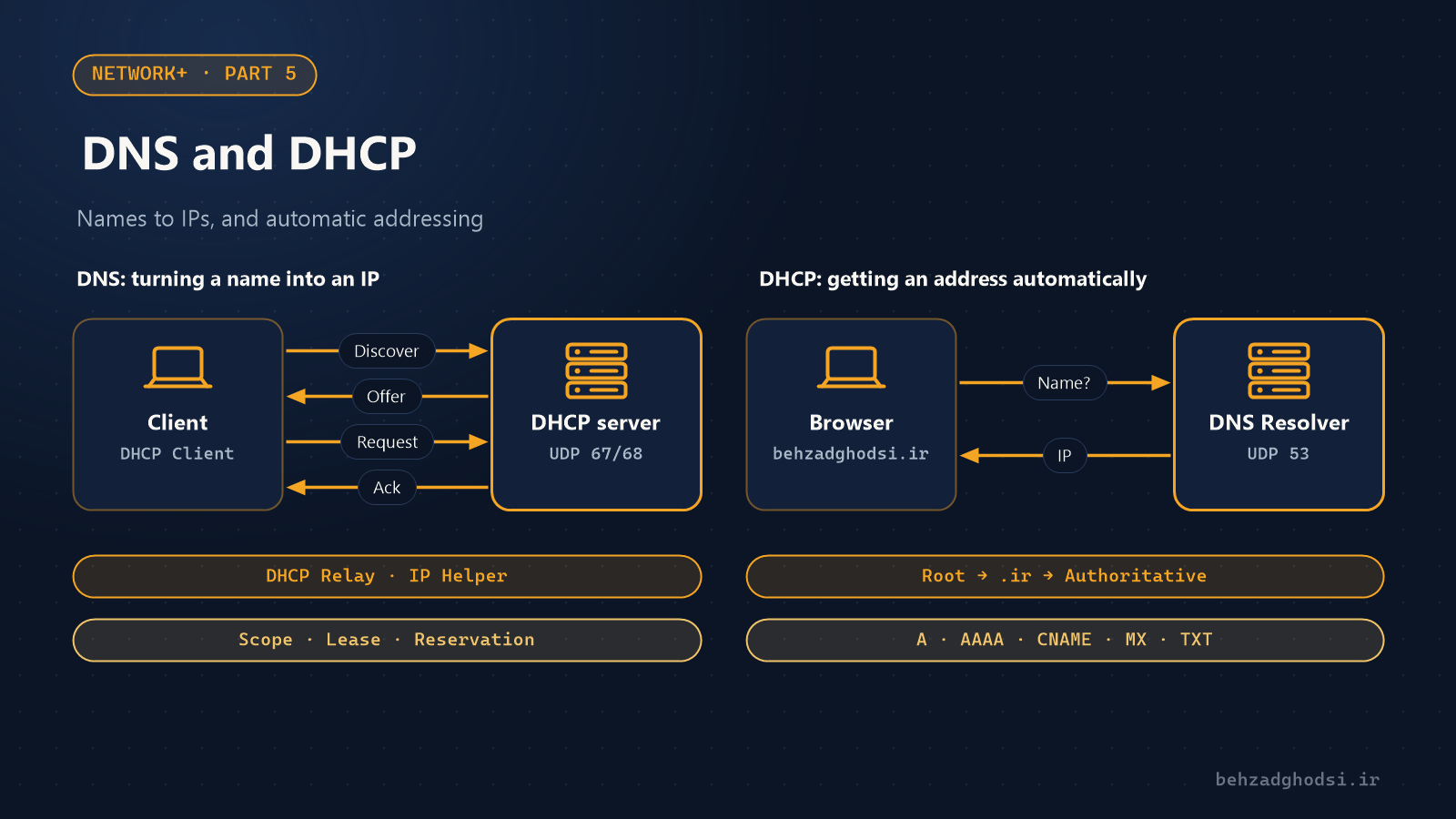
We work with names; computers work with IPs. DNS connects the two. When you type behzadghodsi.ir into a browser:
- The computer first checks its own memory (the DNS cache).
- If it isn't there, it asks the DNS resolver: the address in the network card settings, such as the router or the organisation's DNS server.
- If the resolver doesn't have the answer, it starts at the root, then goes to the servers for the
.irextension, and finally gets the answer from the domain's own authoritative server. - The answer is cached for as long as its TTL says, so the next lookup is faster.
DNS normally runs on UDP 53 and uses TCP 53 for large answers and zone transfers.
Important DNS records
| Record | Use |
|---|---|
| A | Name to IPv4 |
| AAAA | Name to IPv6 |
| CNAME | One name is an alias of another |
| MX | The domain's mail server |
| TXT | Free text, e.g. SPF and domain ownership verification |
| NS | The DNS servers responsible for the domain |
| PTR | IP to name (reverse DNS) |
Troubleshooting DNS
nslookup behzadghodsi.ir
nslookup behzadghodsi.ir 8.8.8.8
ipconfig /flushdns
If the first command fails but the second gets an answer, your internal DNS has a problem. ipconfig /flushdns clears the computer's DNS cache, which is useful after changing records.
In networks with Active Directory, computers must get DNS from the domain controller, not from the internet. If a computer's DNS is set to 8.8.8.8, it won't join the domain.
DHCP: automatic addressing
Without DHCP you would have to enter the IP, mask, gateway and DNS by hand on every device. DHCP does it with four messages, known as DORA:
- Discover: the client broadcasts, "Can anyone give me an address?"
- Offer: the server offers an address.
- Request: the client requests that address.
- Acknowledge: the server confirms, and the address belongs to the client for the lease period.
DHCP runs on UDP 67 (server) and UDP 68 (client).
Terms you should know
- Scope: the range of addresses the server hands out, e.g.
.100to.200. - Exclusion: addresses that must not be handed out, such as those of servers and printers.
- Reservation: a fixed address for a specific MAC. For printers and cameras it is better than a manual IP, because it is managed in one place.
- DHCP relay or IP helper: Discover is a broadcast and doesn't cross a router, so if the DHCP server is in another VLAN, the router or layer 3 switch must forward the request to it.
Troubleshooting DHCP
ipconfig /release
ipconfig /renew
ipconfig /all
If a computer has a 169.254.x.x address, no reply came from DHCP. Check the cable, the switch port's VLAN and whether the scope is full. If users get strange addresses from another range, someone has probably plugged a home modem or router with its own DHCP into the network; DHCP snooping on the switch prevents exactly this.
I've covered setting up DHCP on MikroTik separately in the MikroTik DHCP server.