The first thing every Network+ class teaches is the OSI model, and it is usually the first thing people forget after the exam. That's a shame, because OSI isn't just a table to memorise; it is a map that tells you where to start when troubleshooting.
What is the OSI model?
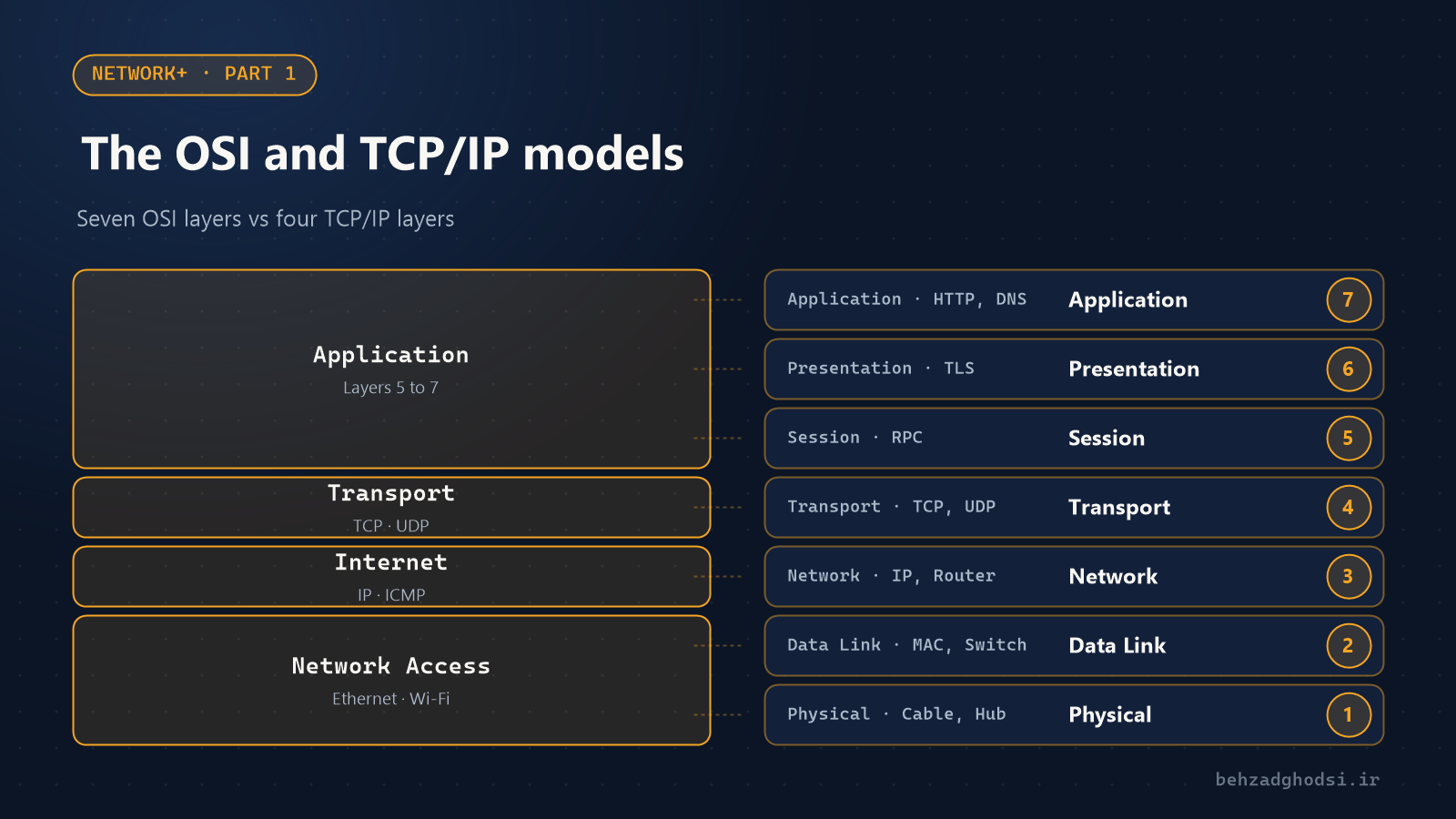
OSI splits communication between two devices into seven layers. Each layer has one job and serves the layers above and below it. When you open a page in your browser, data travels down from layer 7, goes onto the cable, and on the other side climbs back up from layer 1.
| Layer | Name | What it does | Examples |
|---|---|---|---|
| 7 | Application | Services for applications | HTTP, DNS, SMTP |
| 6 | Presentation | Data format, encryption, compression | TLS, JPEG |
| 5 | Session | Opening and closing sessions | RPC, NetBIOS |
| 4 | Transport | Delivery between applications, ports | TCP, UDP |
| 3 | Network | Logical addressing and routing | IP, ICMP, router |
| 2 | Data Link | Delivery within a local network, MAC addresses | Ethernet, switch, VLAN |
| 1 | Physical | Bits on copper, fibre or radio | Cable, connector, hub |
To remember the order from bottom to top, use the well-known sentence: Please Do Not Throw Sausage Pizza Away.
The TCP/IP model: what actually runs
OSI is a teaching model. What actually runs on networks is the TCP/IP model, which does the same work in four layers:
- Application: OSI layers 5 to 7 combined (HTTP, DNS, SSH).
- Transport: the same as layer 4; TCP and UDP.
- Internet: the same as layer 3; IP and ICMP.
- Network Access: layers 1 and 2; Ethernet, Wi-Fi and cabling.
Network+ exam questions usually refer to OSI layer numbers; for example, a "layer 3 switch" is a switch that also routes.
Encapsulation: an envelope per layer
When sending, each layer adds its own header to the data, like a letter placed inside several envelopes:
- Layer 4 adds a TCP or UDP header, and the result is called a segment.
- Layer 3 adds the source and destination IP addresses: a packet.
- Layer 2 adds MAC addresses: a frame.
- Layer 1 turns everything into bits.
How does OSI help with troubleshooting?
In real work, OSI sets the order of checks. Start at the bottom and don't move up until the layer below is healthy:
- Layer 1: is the port light on? Is the cable good?
- Layer 2: is the network card connected to the switch and in the right VLAN?
- Layer 3: are the IP address and gateway correct, and does the gateway answer a ping?
- Layer 4 and up: is the service port open? Is DNS answering correctly?
A few Windows commands, each testing one layer:
ipconfig /all          :: Layer 3: IP address, gateway and DNS
arp -a                 :: Layer 2: known MAC addresses
ping 192.168.1.1       :: Layer 3: reaching the gateway
tracert 8.8.8.8        :: Layer 3: the path to the destination
nslookup behzadghodsi.ir :: Layer 7: DNS is working
If ping 8.8.8.8 works but websites won't open, the problem isn't in the lower layers; look at DNS. That one tip solves half of all "the internet is down" calls.
Summary
- OSI has seven layers and TCP/IP has four.
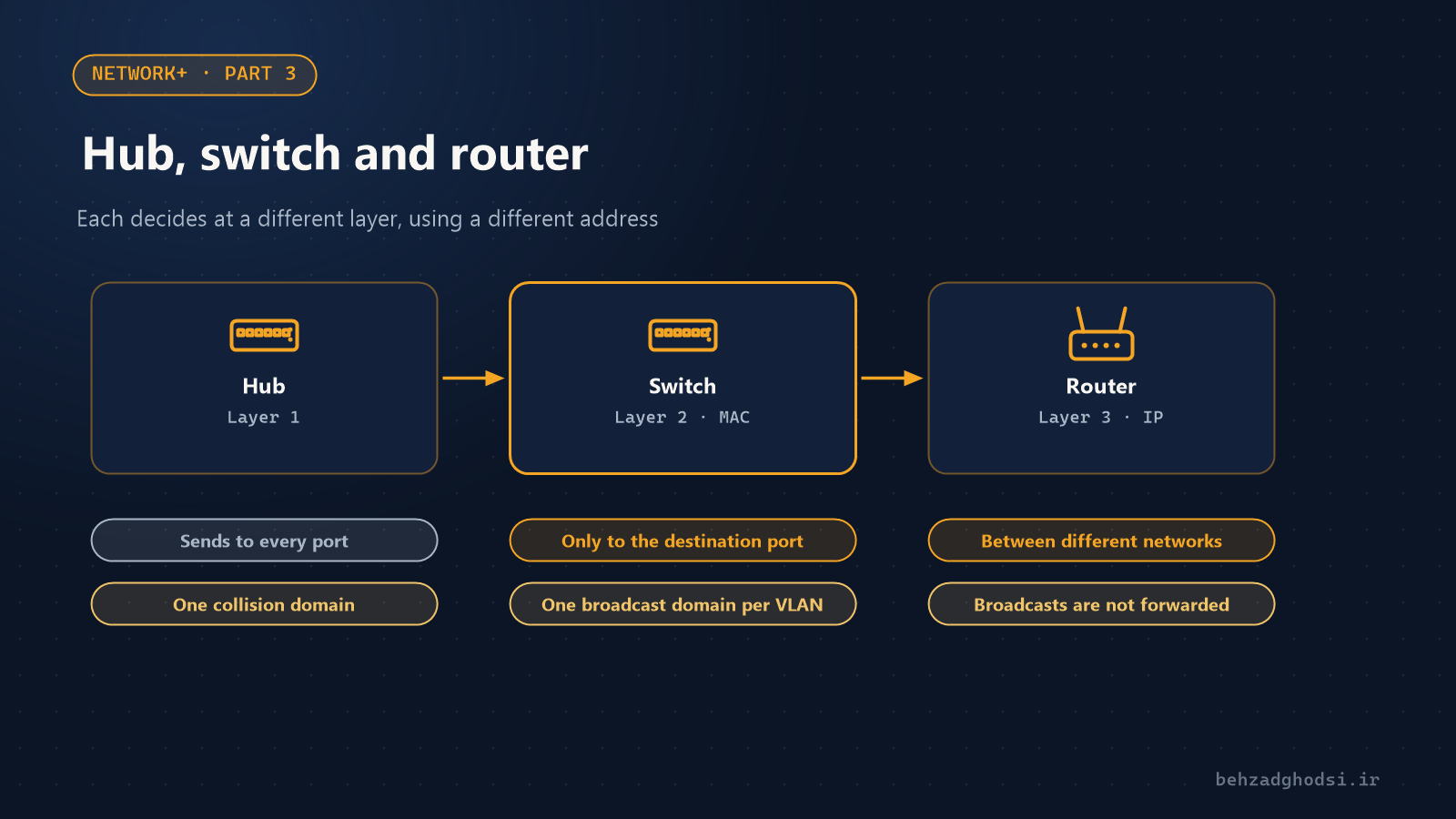
- A hub works at layer 1, a switch at layer 2 and a router at layer 3.
- Start troubleshooting at layer 1 and work your way up one layer at a time.