Most of the problems I see in networks start at layer 1: poor-quality cable, a badly terminated jack, or a cable run right next to a power cable. Cabling is installed once and stays for years, so it pays to choose it well.
Twisted pair cable
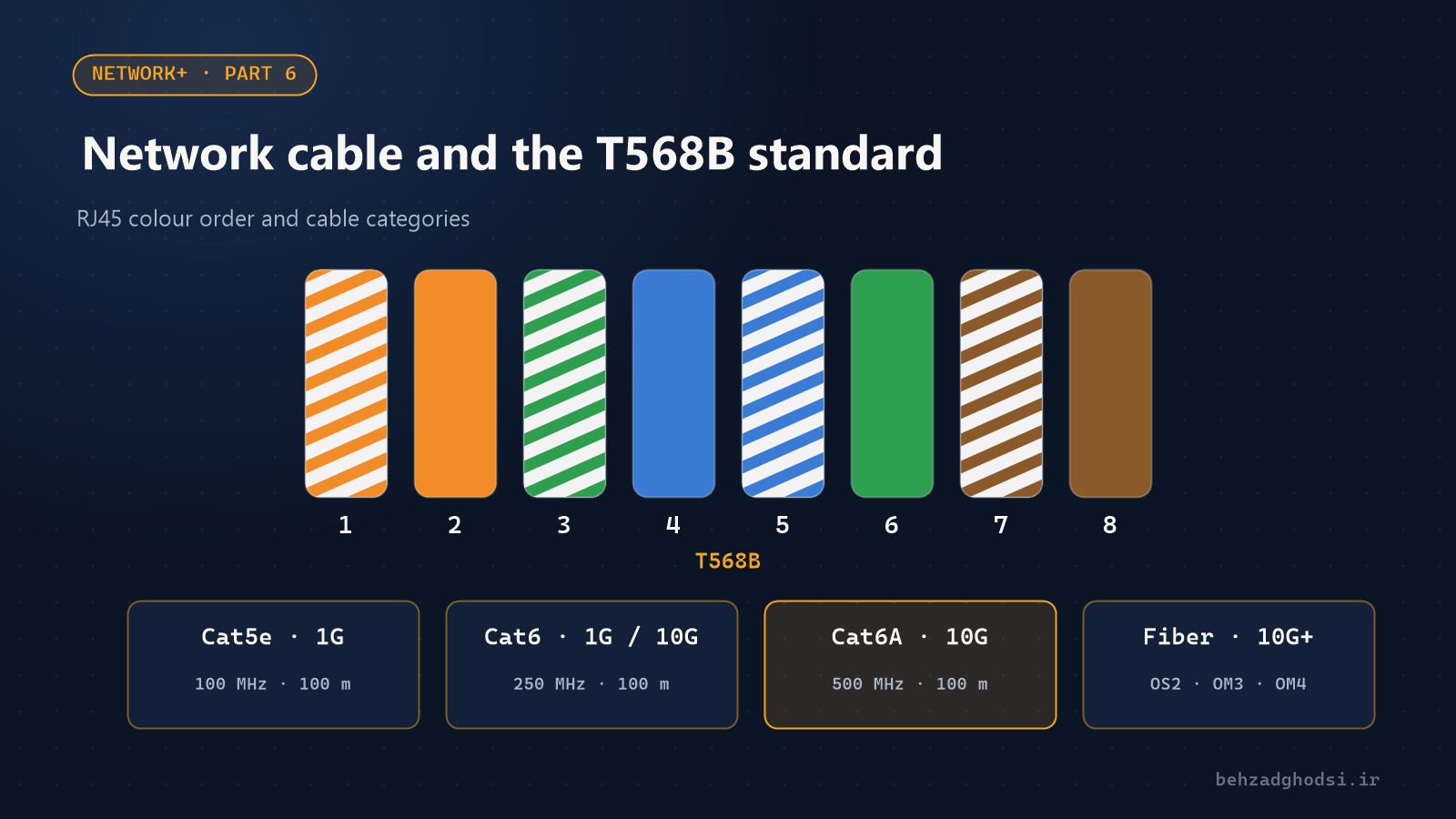
Ordinary network cable has eight wires twisted together in pairs. The twisting reduces noise and interference between pairs. The standard maximum length for all common categories is 100 metres: 90 metres of fixed cable in the wall and 10 metres for patch cords.
| Category | Bandwidth | Speed | Length |
|---|---|---|---|
| Cat5e | 100MHz | 1Gbps | 100 m |
| Cat6 | 250MHz | 1Gbps; 10Gbps up to about 55 m | 100 m |
| Cat6A | 500MHz | 10Gbps | 100 m |
| Cat8 | 2000MHz | 25 and 40Gbps | 30 m; for data centres |
Practical advice: in a new building, install at least Cat6. If the budget allows, or you plan Wi-Fi 6 and 7 access points on PoE, Cat6A is better. The price difference in cable is trivial compared with the cost of recabling.
UTP or STP?
- UTP is unshielded; it is cheaper and easier to work with, and enough for offices.
- STP and FTP have a metal shield and suit noisy environments such as factories and areas near motors and electrical panels. The shield only works if it is properly earthed at both ends.
In industrial sites I have often seen strange dropouts disappear simply by replacing UTP with shielded cable.
T568A and T568B wiring standards
There are two standards for the colour order in an RJ45 connector. T568B is by far the most common in practice:
| Pin | T568B | T568A |
|---|---|---|
| 1 | White-orange | White-green |
| 2 | Orange | Green |
| 3 | White-green | White-orange |
| 4 | Blue | Blue |
| 5 | White-blue | White-blue |
| 6 | Green | Orange |
| 7 | White-brown | White-brown |
| 8 | Brown | Brown |
- Straight-through cable: both ends use the same standard (usually B to B). For almost everything.
- Crossover cable: one end A and the other B. It used to be needed to connect two switches or two computers; today ports have Auto-MDIX and detect this themselves.
The most important rule: keep the pairs twisted right up to the connector. If more than about 1.5 cm is untwisted, a Cat6 cable is no longer Cat6.
Fibre optic
When the distance is over 100 metres, between buildings, or in a noisy environment, fibre is the answer. Fibre carries light instead of electricity, so electrical noise has no effect on it.
| Type | Core | Typical distance | Use |
|---|---|---|---|
| Single-mode (OS2) | 9 microns | Up to tens of kilometres | Between buildings and long distances |
| Multi-mode (OM3 and OM4) | 50 microns | 300 to 400 m at 10G | Inside buildings and data centres |
Common connectors are LC (small, the most common for SFP modules) and SC. The SFP modules at both ends must match the fibre type and wavelength.
I compare fibre with wireless links between buildings in detail in fibre or wireless link?.
Installation tips
- Don't run network cable parallel to and touching power cable; keep a gap or use a separate trunking.
- Label everything; both ends of each cable and every patch panel port should be numbered.
- Test every cable after installation. A simple tester only shows continuity; a professional handover needs certification testing.
- Buy ready-made, standard patch cords; hand-made patch cords are the most common cause of CRC errors.